
The solution to smart home chaos isn’t a better app or a central hub—it’s a fundamental shift in philosophy towards invisible, local-first systems.
- True automation anticipates your needs using presence and state changes, not voice commands or app taps.
- Prioritizing local control protocols like Zigbee and Thread ensures your home functions perfectly even when the internet is down.
Recommendation: Start by segmenting your network and auditing every automation with one question: does this remove cognitive load or add to it?
You bought into the promise of a smart home: a seamless, futuristic environment that anticipates your needs. The reality, for many, is a digital nightmare. You’ve become a reluctant IT administrator for your own house, juggling fifteen different apps, troubleshooting disconnected devices, and being bombarded with notifications. The dream of a home that works for you has been replaced by the chore of working for your home. You’re not just a homeowner; you’re a digital janitor, constantly managing updates, permissions, and cloud service outages.
The conventional advice often misses the point. You’re told to create more routines, buy into a single ecosystem, or use a central hub like Alexa or Google Assistant. But these solutions often just plaster over the fundamental problem: a dependency on fragile, cloud-based systems and an obsession with control through an app. The more devices you add, the more complex the web of dependencies becomes, and the more time you spend maintaining it. This is the very definition of automation fatigue.
But what if the path to a truly smart home isn’t about adding more layers of technology, but about strategically removing them? The key is to shift your mindset from a “command and control” model to a “set-it-and-forget-it” philosophy. This guide will re-center your approach on three pillars: building an invisible system that anticipates, ensuring rock-solid resilience through local control, and applying a minimalist’s discipline to what you choose to automate. It’s time to make your technology disappear and get back the effortless convenience you were promised.
This article provides a complete framework for reclaiming your smart home from the chaos. Explore the sections below to build a system that is secure, resilient, and truly intelligent.
Summary: How to Automate Your Home Without Becoming a Slave to App Updates?
- Why Smart Appliances Are a Security Risk After Just 3 Years?
- How to Create “Invisible” Smart Routines That Work Without Voice Commands?
- Zigbee or Wi-Fi: Which Protocol Ensures Your Lights Work When the Internet Is Down?
- The Mistake of Automating Tasks That Are Faster to Do Manually
- How to Configure Your Smart Home So Guests Can Use the Lights Without an App?
- How to Use Your Router’s Guest Network to Isolate Insecure Gadgets?
- Why Thread Devices Respond Instantly Compared to Cloud-Based Wi-Fi Gadgets?
- How to Create a Dedicated IoT Network to Protect Your Personal Data?
Why Smart Appliances Are a Security Risk After Just 3 Years?
The sleek smart refrigerator or TV you just installed comes with an invisible expiration date. Most manufacturers provide software and security updates for a limited time, often just a few years. After this support window closes, your device becomes a sitting duck. It no longer receives patches for newly discovered vulnerabilities, turning a helpful appliance into a potential gateway for hackers to enter your home network. The convenience it offers is quickly overshadowed by the liability it creates.
This isn’t a theoretical threat. According to NETGEAR’s 2024 IoT Security Landscape Report, there is a significant risk, with 34% of vulnerabilities discovered in TV sets, which are devices consumers rarely think to update or replace. These “smart” devices often use default, weak passwords and connect directly to the internet, broadcasting their presence. Once support ends, they are permanently vulnerable. In August 2024, a widespread attack highlighted this danger when hackers exploited these weaknesses to gain unauthorized access to thousands of smart locks, cameras, and thermostats, leading to serious privacy breaches.
The problem is systemic. The business model for many consumer-grade IoT devices prioritizes sales over long-term security. A device sold today is a legacy product tomorrow, and the incentive to support it dwindles. As a homeowner, you cannot rely on manufacturers for indefinite protection. You must assume that any internet-connected device will eventually become insecure. This means the only sustainable strategy is to build a network architecture that isolates these potential threats from your sensitive personal data from day one, a concept we will explore in detail.
How to Create “Invisible” Smart Routines That Work Without Voice Commands?
A truly intelligent home doesn’t wait for your command; it anticipates your needs. The constant “Hey Google, turn on the lights” or fumbling for your phone to launch an app is a sign of immature automation. It’s interactive, but not intelligent. The goal is to create “invisible” routines that are triggered by your presence and the state of your environment. This is the difference between a house full of gadgets and a home that feels alive and responsive.
This is achieved by moving away from command-based triggers and embracing state-based automation. Instead of telling your home you’ve arrived, a combination of sensors—a door sensor tripping, your phone joining the Wi-Fi, and a motion sensor in the hallway activating—tells the system you are home. The lights fade on, the thermostat adjusts, and your favorite playlist begins, all without a single word or tap. This requires a central brain, like Home Assistant, that processes everything locally, observing device states rather than waiting for external commands.
To make this practical, you can integrate discreet physical triggers for scenes that aren’t easily predicted. An NFC tag hidden under your nightstand can be tapped with your phone to initiate a “goodnight” scene, turning off all lights and locking the doors. A small, minimalist smart button by the entryway can trigger a “goodbye” scene. These physical interfaces are faster, more reliable, and more intuitive than voice or apps.
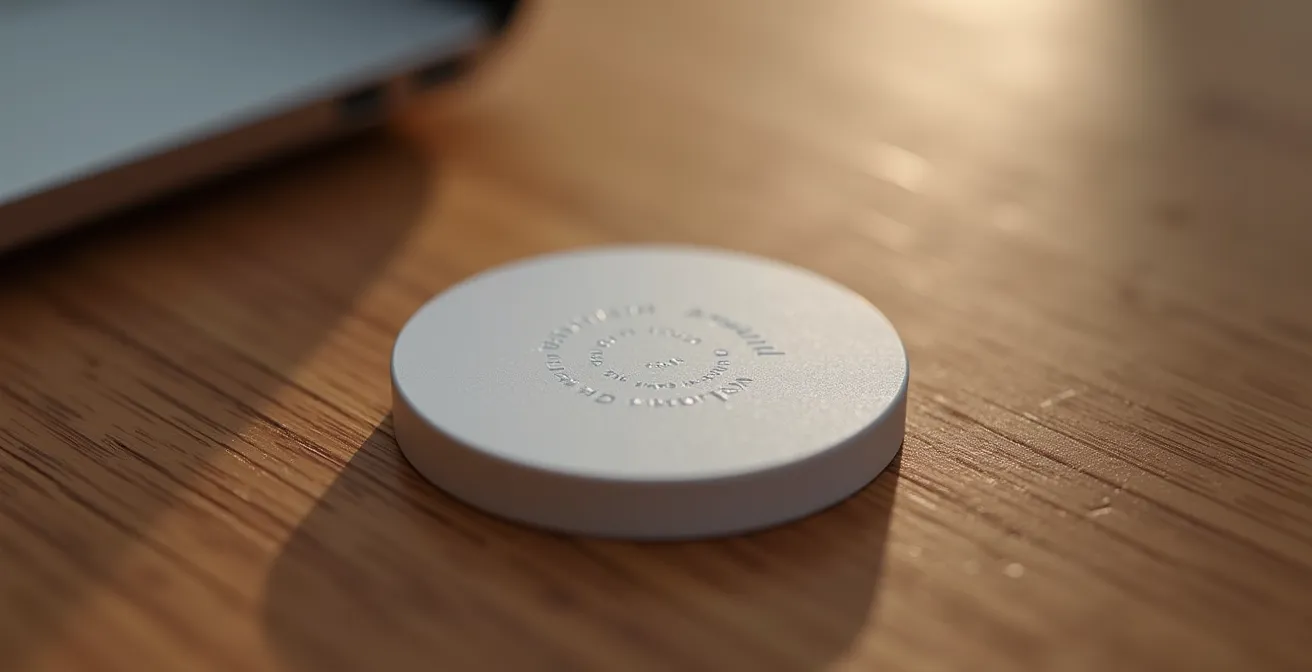
As the image shows, these elements can blend seamlessly into your decor, providing control without cluttering your space or your mind. The focus shifts from conscious control to subconscious interaction. The technology fades into the background, serving you silently and effectively, which is the ultimate goal of a minimalist smart home.
Zigbee or Wi-Fi: Which Protocol Ensures Your Lights Work When the Internet Is Down?
The moment your internet goes down is the ultimate test of your smart home’s intelligence. If your lights, switches, and sensors become useless bricks, you don’t have a smart home; you have a cloud-dependent liability. The choice of communication protocol is the single most important factor in building a resilient, local-first system. While Wi-Fi is ubiquitous, devices that rely on it often route commands through a remote server, creating a critical point of failure.
This is where mesh protocols like Zigbee, Z-Wave, and Thread excel. They are designed for local device-to-device communication. When you press a Zigbee light switch, the signal travels directly to the light bulb through a local hub, without ever touching the internet. This results in near-instantaneous response and ensures that your core functions—like lighting and security—always work. As the Home Assistant Foundation puts it in their official documentation: “Home Assistant communicates with your devices locally, and will fallback to pulling in data from the cloud if there is no other option.” This philosophy prioritizes autonomy and reliability.
The following table, based on a comparative analysis from home technology experts, breaks down the key differences:
| Protocol | Internet Required | Local Control | Range | Best Use Cases |
|---|---|---|---|---|
| Zigbee | No | Yes (with hub) | 10-20m per device (mesh) | Lights, sensors, locks |
| Z-Wave | No | Yes (with hub) | 30m per device (mesh) | Security devices, thermostats |
| Wi-Fi (with local firmware) | No (if configured) | Yes (ESPHome/Tasmota) | Router dependent | High-bandwidth devices |
| Thread | No | Yes | Mesh network | Future-proof devices |
For a truly set-it-and-forget-it system, a combination is often best. Use Zigbee or Z-Wave for critical, low-bandwidth devices like lights, motion sensors, and door locks. Reserve Wi-Fi for high-bandwidth devices like security cameras and smart speakers, but ensure they are on an isolated network. This hybrid approach gives you the best of both worlds: the speed and reliability of local control for essentials, and the bandwidth of Wi-Fi for data-heavy tasks.
The Mistake of Automating Tasks That Are Faster to Do Manually
In the rush to automate everything, it’s easy to fall into a trap: creating complex automations for tasks that are trivially simple to do by hand. Automating your coffee pot might sound futuristic, but if it takes 15 minutes to configure a routine that saves you 10 seconds of pushing a button, you’ve lost time, not gained it. This is the core of smart home regret, and a 2024 survey reveals that 10% of Americans regret their smart home investments. The problem isn’t the technology; it’s the application.
A digital minimalist’s approach to automation focuses on return on investment (ROI), where the investment is your time and mental energy. The goal should not be to automate for automation’s sake, but to eliminate friction and cognitive load. A great automation is one you set up once and never think about again, like lights turning on when you enter a dark room. A bad automation is one that requires constant tweaking or solves a non-existent problem.
Before automating any new task, apply a simple framework. The most critical filter is the “Three-Second Rule”: if a manual task takes less than three seconds to complete (like flipping a light switch), think twice before automating it. The setup and maintenance time will likely never pay for itself. Instead, focus your energy on automating multi-step processes (e.g., a “movie night” scene that dims lights, closes blinds, and turns on the TV) or tasks you genuinely forget to do (e.g., ensuring the garage door is closed at night).
Your Action Plan: Auditing Your Automations
- Calculate time saved: Measure the actual seconds saved per day for each automated task. Be honest.
- Factor setup time: Add the initial configuration time plus any estimated monthly maintenance or troubleshooting.
- Apply the Three-Second Rule: Immediately flag and consider deleting any automation that fails this test.
- Focus on multi-step processes: Prioritize routines that chain together multiple actions, as this is where the biggest time and effort savings lie.
- Target cognitive unloading: Ask yourself, “Does this automation free up my mental space?” Prioritize tasks you often forget, not tasks that are merely easy.
By applying this disciplined approach, you transform your smart home from a collection of novelties into a powerful tool for simplifying your life. You’ll have fewer automations, but each one will be significantly more impactful.
How to Configure Your Smart Home So Guests Can Use the Lights Without an App?
A smart home should never make its occupants, especially guests, feel unintelligent. If a visitor needs to download an app, learn a voice command, or ask for help just to turn on the bathroom light, your system has failed the most basic test of usability. A truly smart home is intuitive and accessible to everyone, regardless of their tech-savviness. This means preserving simple, universal methods of control.
The most robust solution is to install smart switches instead of smart bulbs. A smart switch replaces the existing wall switch, allowing it to be controlled both manually like a normal switch and remotely via your automation system. This provides the best of both worlds: guests can operate the lights instinctively, while you retain the ability to integrate them into your automated scenes. The physical switch becomes the ultimate fallback, ensuring that core functionality is never lost.

For more complex actions, strategically placed and clearly labeled physical buttons are a guest’s best friend. A single button near the guest bed labeled “All Off” is far more intuitive than explaining a voice command. These buttons can be programmed to control specific scenes, offering convenience without the learning curve. Finally, your system should have a “guest mode” that automatically resets any changes at a set time, like 4 AM, ensuring the room is always returned to its default state for the next person.
The key principle is graceful degradation. The system should be feature-rich for you, but simple and functional for others. By testing your setup with Wi-Fi disabled, you can quickly identify any dependencies that would frustrate a guest. If a light can’t be turned on from the wall, the design is flawed.
How to Use Your Router’s Guest Network to Isolate Insecure Gadgets?
Not all smart devices are created equal, and many—especially older or cheaper ones—are riddled with security flaws. Connecting a vulnerable smart plug or an unsupported camera directly to your main Wi-Fi network is like leaving a side door unlocked. If that device is compromised, it can provide a hacker with a foothold to attack the most sensitive devices on your network, like your laptop or phone.
A simple yet highly effective first line of defense is to repurpose your router’s “Guest Network” feature as an IoT quarantine zone. Most modern routers allow you to create a separate Wi-Fi network for visitors. This network provides internet access but is, by default, isolated from your primary network. By connecting all your untrusted or questionable IoT gadgets to this guest network, you place them behind a digital wall.
This setup is powerful because it leverages a feature called “client isolation.” This prevents devices on the guest network from communicating with each other or with devices on your main network. Even if a hacker compromises your smart toaster, they will be trapped on the isolated network, unable to see or access your personal computer where you do your online banking. Considering that NETGEAR’s security research shows an average of 10 attacks per day on home network devices, this simple segmentation is no longer a suggestion; it’s a necessity.
Setting this up takes only a few minutes. Access your router’s administration panel, enable the guest network, give it a unique name (like “HomeIoT”), and set a strong, unique password. Then, methodically move all your smart gadgets—plugs, lights, cameras, and appliances—over to this new network. Your trusted devices, like phones and computers, remain on your main, secure network.
Why Thread Devices Respond Instantly Compared to Cloud-Based Wi-Fi Gadgets?
The frustrating delay between asking your smart speaker to turn on a light and the light actually turning on is a classic symptom of cloud dependency. This lag, or latency, occurs because the command takes a long and convoluted journey: from your speaker to your router, out to the internet, to a server halfway across the world, back across the internet to your router, and finally to the light bulb. This round trip can take anywhere from half a second to several seconds.
This is where local-first protocols like Thread demonstrate their profound superiority. Thread is a modern, IP-based mesh networking protocol designed specifically for IoT devices. Like Zigbee, it creates a direct, local network between devices. When you issue a command to a Thread device, the signal travels directly from your phone or hub to the device itself. There is no trip to the internet, no remote server, and therefore, virtually no perceptible delay. As one analysis notes, the key benefit is that “commands and automations trigger instantly because they don’t travel to remote servers.”
This table, using data from a detailed technical comparison, starkly illustrates the difference in performance:
| Aspect | Thread (Local) | Cloud Wi-Fi |
|---|---|---|
| Command Path | Phone → Device (direct) | Phone → Router → Internet → Server → Router → Device |
| Average Latency | <100ms | 500-2000ms |
| Network Type | Self-healing mesh | Hub-and-spoke |
| Internet Required | No | Yes |
| Battery Life Impact | Optimized sleep modes | Constant connection drain |
Beyond speed, Thread offers superior reliability and power efficiency. Its self-healing mesh network means that if one device goes offline, the network automatically reroutes signals through other devices. Furthermore, its low-power design allows battery-powered sensors to last for years, not months. For a homeowner building a system for the long term, choosing devices that support Thread is a strategic investment in a faster, more resilient, and future-proof smart home.
Key takeaways
- The ultimate goal is an “invisible” home that anticipates needs via sensors, not one that constantly needs commands.
- Prioritize local-first protocols like Zigbee and Thread to build a resilient system that works without an internet connection.
- Be a minimalist: only automate tasks that remove significant friction or cognitive load, not tasks that are faster to do manually.
How to Create a Dedicated IoT Network to Protect Your Personal Data?
While using a guest network is a good first step, the ultimate solution for security is to create a truly segmented network architecture. This expert-level approach involves creating multiple, distinct Virtual LANs (VLANs) within your home network, each with its own set of strict rules. This is the same strategy used by corporations to protect sensitive data, scaled down for the home. It ensures that even if a device is compromised, the breach is contained within a small, low-value digital sandbox.
The most effective model is a three-network architecture: one for your trusted personal devices (laptops, phones), one for your semi-trusted IoT devices (smart speakers, lights, appliances), and one for untrusted guests. Each network is firewalled from the others. Your personal devices can initiate contact with the IoT network (e.g., your phone’s app controlling a light), but devices on the IoT network are strictly forbidden from initiating any contact with your personal network.
This is critically important because many IoT devices leak personally identifiable information (PII). Research has found that IoT devices inadvertently expose unique hardware addresses and other identifiers, which can be combined to uniquely identify and track a household. By placing these chatty devices on a separate network and using tools like a Pi-hole to filter their DNS requests, you can block them from “phoning home” to advertising or tracking servers, dramatically enhancing your privacy.
Setting up a VLAN-based system requires a more advanced router or dedicated networking hardware, but it provides unparalleled security and control. It transforms your network from a flat, open field into a fortress with multiple layers of defense. It’s the definitive way to enjoy the benefits of smart technology without exposing your personal data to the risks of insecure gadgets. This is the foundation of a zero-trust approach to home cybersecurity.
By implementing these principles of local control, invisible automation, and disciplined security, you can finally achieve the original promise of the smart home: a space that is not only intelligent but also secure, reliable, and blissfully simple to live with. Your first step is to perform an audit of your current devices and network, identifying cloud dependencies and security vulnerabilities to build your path forward.